Sign in
OpenCode integration guide
Developer toolCLI toolUpdated: 2026-04-17Introduction
OpenCode is an open-source AI coding assistant that runs in your terminal, helping you write, debug and refactor code conversationally. Point it at the SeaWhale AI API and you can use Claude, GPT-5, Qwen and other powerful models.
Key capabilities
- 💻 Code generation — generate code from a natural language description
- 🐛 Debugging — locate and fix bugs quickly
- ♻️ Refactoring — improve code structure and performance
- 📝 Documentation — add comments and docs to your code
- 🔍 Code explanation — make sense of complex logic
- 🚀 Many languages — Python, JavaScript, Java, Go and more
Why SeaWhale AI?
| Advantage | Description |
|---|---|
| 🌐 Direct access | Reachable directly, stable connectivity |
| 💰 Flexible billing | Pay as you go, no subscription required |
| ⚡ High performance | Low latency, fast responses |
| 🔒 Data security | Code is not stored, protecting your privacy |
| 🤖 Many models | Claude, GPT-5, Qwen and more |
| 🆓 New user credit | New accounts receive free credit |
Supported models
Through the OpenAI-compatible endpoint, SeaWhale AI supports:
| Family | Recommended model | Strengths | Best for |
|---|---|---|---|
| Claude Sonnet | claude-sonnet-4-6 | Strong at code, accurate reasoning, 200K context | Complex projects, refactoring |
| Claude Opus | claude-opus-4-7 | Highest capability, deep reasoning | Architecture, complex algorithms |
| GPT-5 | gpt-5.4 | Strong multimodal, well balanced | Everyday work, varied tasks |
| DeepSeek | deepseek-v3 | Flagship open model, excellent at code | Coding tasks |
| Qwen | qwen-max | Strong in Chinese, fast responses | Chinese-language projects |
Choosing a model
- Everyday coding:
claude-sonnet-4-6(strong at code, good value) - Complex tasks:
claude-opus-4-7(highest capability) - Best value:
deepseek-v3(low cost, strong at code)
Before you begin
1. Get a SeaWhale AI API key
- Open the SeaWhale AI console
- Sign up and log in
- Generate an API key on the API management page
- Make sure your account has enough balance or free credit
New user credit
New SeaWhale AI accounts receive free starter credit, usable across all model inference services.
2. System requirements
| Item | Requirement |
|---|---|
| Operating system | macOS 10.15+, Windows 10+, Linux |
| Node.js | v18.0 or later |
| npm | v7.0+ |
| Terminal | A modern terminal with color support |
Checking your Node.js version
bash
node -vVersion v18.x.x or later meets the requirement. If Node.js is missing, download it from the Node.js website.
Installing OpenCode
Global install
bash
npm install -g opencode-aiVerify the installation
bash
opencode -vA version number means the install succeeded.
Installation notes
- If installation fails, check that Node.js is version 18 or later
- To speed up npm, you can switch registries:
npm config set registry https://registry.npmmirror.com - On macOS/Linux, permission errors can be resolved with
sudo npm install -g opencode-ai
Configuring SeaWhale AI
Configuration file (recommended)
Create or edit the OpenCode configuration file:
- macOS / Linux:
~/.config/opencode/opencode.json - Windows:
C:\Users\YourName\.config\opencode\opencode.json
About the Base URL
baseURL must end with /v1, otherwise you get a 404 Not Found error.
json
{
  "$schema": "https://opencode.ai/config.json",
  "provider": {
    "seawhale": {
      "npm": "@ai-sdk/openai-compatible",
      "name": "SeaWhale AI",
      "options": {
        "baseURL": "https://api.atalk-ai.com/v1",
        "apiKey": "sk-xxxxxxxxxxxxxxxx"
      },
      "models": {
        "claude-sonnet-4-6": {
          "name": "Claude Sonnet 4.6",
          "modalities": {
            "input": ["text", "image"],
            "output": ["text"]
          },
          "limit": {
            "context": 200000,
            "output": 64000
          }
        },
        "claude-opus-4-7": {
          "name": "Claude Opus 4.7",
          "modalities": {
            "input": ["text", "image"],
            "output": ["text"]
          },
          "limit": {
            "context": 200000,
            "output": 32000
          }
        },
        "deepseek-v3": {
          "name": "DeepSeek V3",
          "modalities": {
            "input": ["text"],
            "output": ["text"]
          },
          "limit": {
            "context": 128000,
            "output": 8192
          }
        },
        "gpt-5.4": {
          "name": "GPT-5.4",
          "modalities": {
            "input": ["text", "image"],
            "output": ["text"]
          },
          "limit": {
            "context": 128000,
            "output": 16384
          }
        },
        "qwen-max": {
          "name": "Qwen Max",
          "modalities": {
            "input": ["text"],
            "output": ["text"]
          },
          "limit": {
            "context": 32768,
            "output": 8192
          }
        }
      }
    }
  }
}
json
{
  "$schema": "https://opencode.ai/config.json",
  "provider": {
    "seawhale": {
      "npm": "@ai-sdk/openai-compatible",
      "name": "SeaWhale AI",
      "options": {
        "baseURL": "https://api.atalk-ai.com/v1",
        "apiKey": "sk-xxxxxxxxxxxxxxxx"
      },
      "models": {
        "claude-sonnet-4-6": {
          "name": "Claude Sonnet 4.6",
          "modalities": {
            "input": ["text", "image"],
            "output": ["text"]
          },
          "limit": {
            "context": 200000,
            "output": 64000
          }
        }
      }
    }
  }
}
Notes
- Replace
sk-xxxxxxxxxxxxxxxxwith your real SeaWhale AI API key - Quit and restart OpenCode after editing the config for changes to take effect
- Keep your API key safe and never commit it to a repository
Getting started
Starting OpenCode
bash
cd your-project    # Change into your project
opencode           # Start OpenCode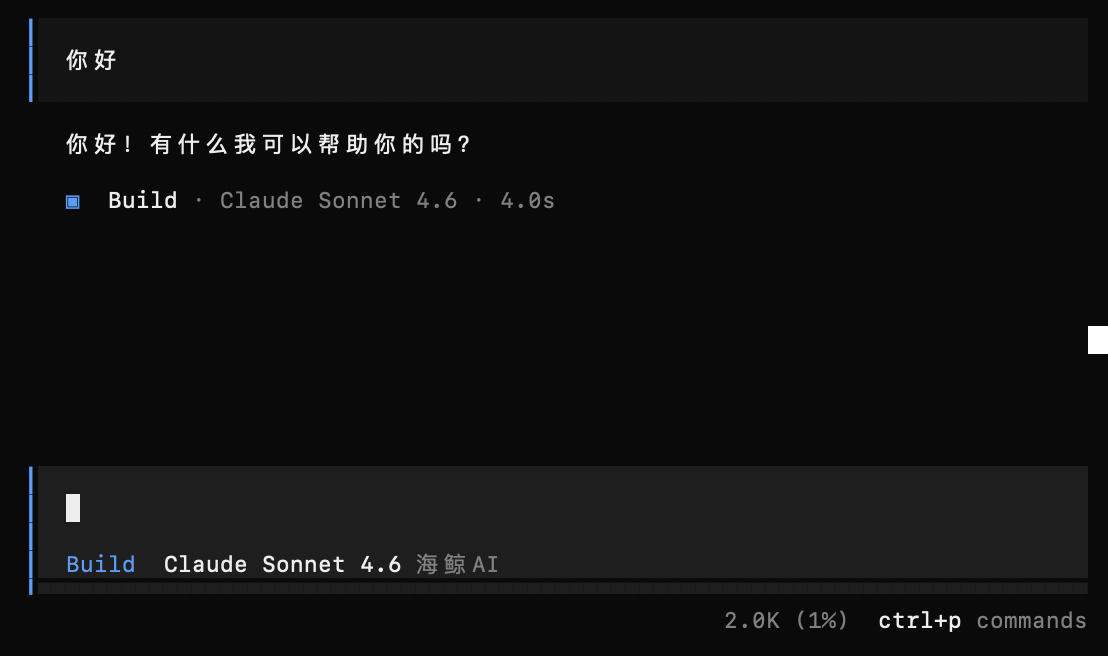
TIP
OpenCode uses the current directory as project context, so start it in the right place. If you do not have a project yet, run mkdir my-project && cd my-project first.
Common commands
| Command | What it does |
|---|---|
/connect | Connect or switch providers |
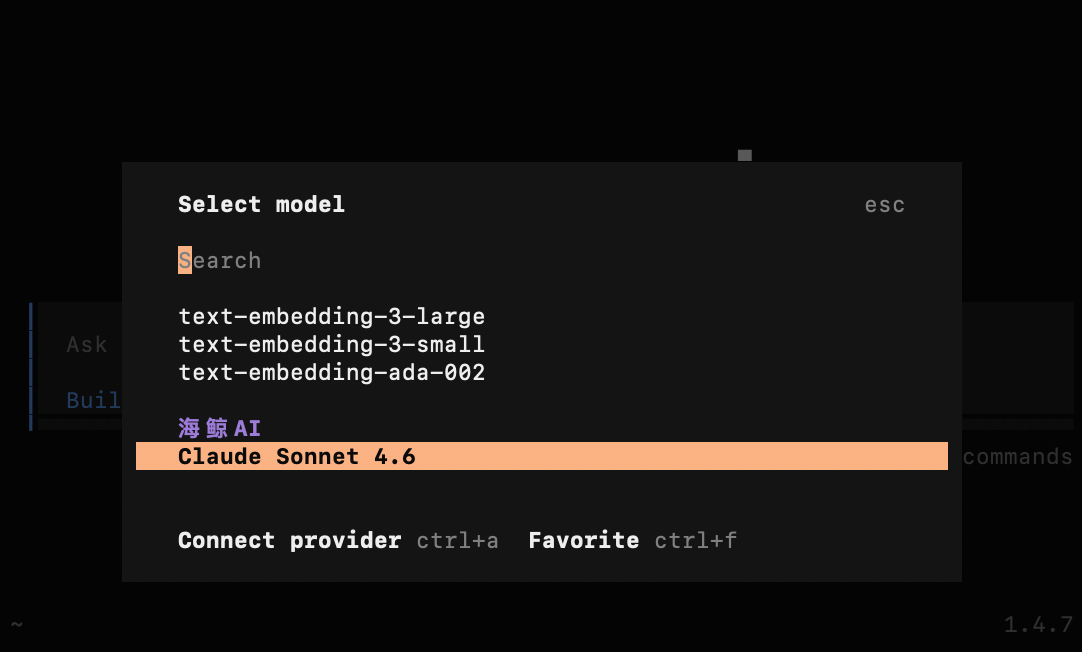
/models | Browse and switch models |
/clear | Clear conversation history |
/help | Show help |
Switching models
Type /models, search for SeaWhale AI or a model name (such as claude or deepseek), and select the model you want.
Worked examples
Example 1: code generation
👤 User:
Write a Python function that parses a JSON file and returns the values of a given field

🤖 OpenCode:
def extract_field(filepath, field):
    import json
    with open(filepath, 'r', encoding='utf-8') as f:
        data = json.load(f)
    if isinstance(data, list):
        return [item.get(field) for item in data if isinstance(item, dict)]
    elif isinstance(data, dict):
        return data.get(field)
    return None
Example 2: debugging
👤 User:
This function raises KeyError — please fix it:
def get_user_name(user):
    return user['name']

🤖 OpenCode:
Use .get() for safe access with a default value:
def get_user_name(user):
    return user.get('name', 'Unknown user')
Saving tokens
1. Start in the specific project directory
Best practices
- Start OpenCode inside the specific project directory, not a parent directory
- Use
.gitignoreto excludenode_modules/,dist/and similar - Delete or move large binary files (images, archives and so on)
2. Manage conversation history
| Command | When to use | Effect |
|---|---|---|
/clear | Before a new task | Clears all history and resets the context |
3. Give precise instructions
| ❌ Vague | ✅ Precise |
|---|---|
| "Optimize this code" | "Refactor parse_data in utils.py to use a list comprehension" |
| "Fix this for me" | "Add error handling at line 45 of index.js to catch API failures" |
| "Something's wrong" | "Fix the division-by-zero in calc.py and add input validation" |
FAQ
Q1: How do I switch to a specific model?
Type /models and search by name (such as claude or gpt-5), then select the model. An empty result means the current version does not support that model yet.
Q2: Connection failures, 401 or 404 errors
- Check the API key is correct (it starts with
sk-) - Confirm the config path is
~/.config/opencode/opencode.json(the file isopencode.json, notconfig.json) - Confirm
baseURLends with/v1:https://api.atalk-ai.com/v1 - Sign in to the SeaWhale AI console and check your balance
- Quit and restart OpenCode after editing the config
Q3: Responses are slow
- Switch to a lighter model (such as
gpt-5-miniorclaude-haiku-4-5-20251001) - Use
/clearto drop a long conversation history and shorten the context
Q4: How do I update OpenCode?
bash
npm install -g opencode-ai@latestQ5: Which programming languages are supported?
OpenCode supports all mainstream programming languages, including:
Supported languages
Web development: JavaScript, TypeScript, HTML, CSS, Vue, React
Backend development: Python, Java, Go, Rust, C/C++, C#, PHP, Ruby
Mobile development: Swift, Kotlin, Dart (Flutter)
Data science: Python (NumPy/Pandas), R, SQL
Other: Shell, YAML, JSON, Markdown
Error codes
| HTTP status | Meaning | How to fix |
|---|---|---|
| 401 | API key auth failed | Check the API key; confirm the Base URL points at SeaWhale AI |
| 403 | Insufficient permission | Check API key permissions and model access |
| 429 | Rate limited | Wait a moment and retry, or increase your account quota |
| 500 | Server error | Retry later, or contact support |
Related resources
- 📚 Quick start — SeaWhale AI API basics
- 🎯 Model list — every available model
- 🔧 API reference — the complete API documentation
Other AI coding tools
| Tool | Platform | Characteristics |
|---|---|---|
| OpenCode | CLI | Open source, lightweight, terminal-based |
| Claude Code | CLI | Official Anthropic tool, deep code understanding |
| Cline | VSCode | IDE extension, plans and runs multi-step tasks |
| Cherry Studio | Desktop app | Graphical interface, multi-model management |
Support
| Channel | Response time | Best for |
|---|---|---|
| 📖 Documentation | Immediate | Common questions |
| 💬 Live support | Weekdays 9:00–18:00 | Real-time technical questions |
| 📧 Email support | Within 24 hours | Detailed reports and feedback |
© 2024 SeaWhale AI. All rights reserved.
Last updated 2026-04-17