Sign in
Chatbox integration guide
RecommendedUpdated: 2025-11-26Introduction
Chatbox is a cross-platform AI client and assistant that lets you talk to large models without setting up a development environment. With Chatbox you can:
- 🚀 Connect quickly to the 200+ AI models offered by SeaWhale AI
- 💰 Pay as you go — no subscription, pay only for what you use
- 🔄 Use the OpenAI-compatible API and switch models seamlessly
- 🖥️ Run anywhere — Windows, macOS, Linux and the web
Before you begin
Make sure you have:
- ✅ A SeaWhale AI API key (how to get one)
- ✅ Enough account balance to call model services
- ✅ Picked a text generation model from the model list
Note
Chatbox features change between releases, so treat the client's actual behavior as authoritative for model support.
Setup
1. Download and install Chatbox
Visit the Chatbox website and download the build for your platform (Windows/macOS/Linux), or use the web version.
| Platform | Download | Notes |
|---|---|---|
| Windows | Download the .exe installer | Windows 10+ |
| macOS | Download the .dmg installer | macOS 11+ |
| Linux | Download the AppImage | Major distributions |
| Web | Use it online | No installation needed |
2. Configure SeaWhale AI
2.1 Add a custom provider
- Click the Settings icon in the bottom left of Chatbox
- Choose Model provider
- Click Add at the bottom
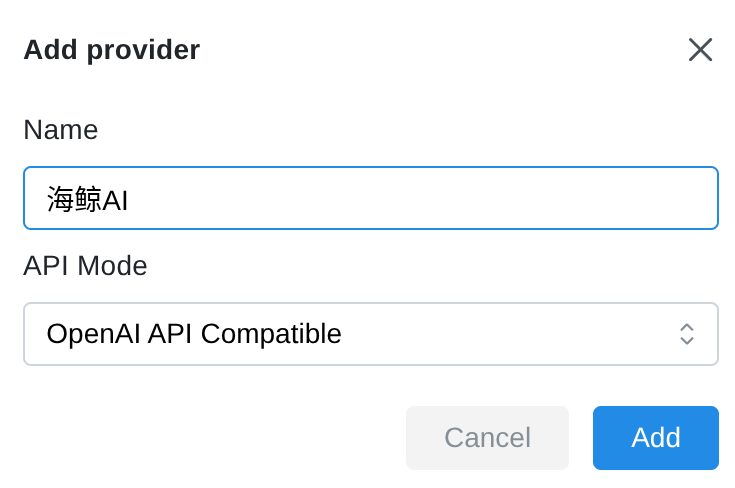
- In the dialog:
- Name: enter "SeaWhale AI"
- API mode: choose "OpenAI API compatible"
- Click Add to create it
2.2 Configure the API parameters
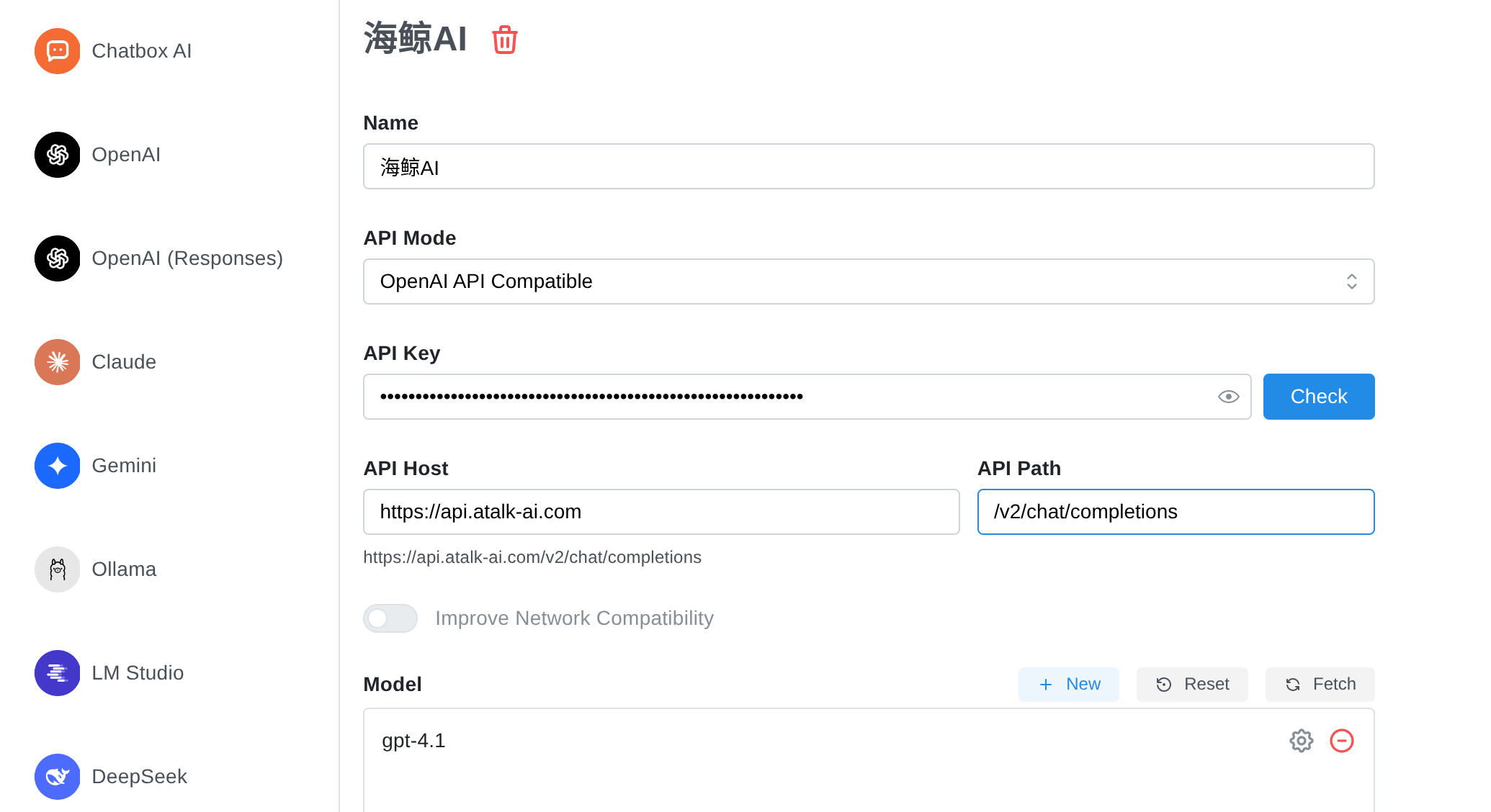
| Setting | Description | Example |
|---|---|---|
| API key | The API key from your SeaWhale AI account | sk-xxxxxxxxxxxxxxxx |
| API host | The SeaWhale AI API address | https://api.atalk-ai.com |
| API path | Leave empty | /v2/chat/completions |
| Model | Click New and enter the model ID | gpt-4o and others |
Popular models
- GPT-4 Turbo —
gpt-4-turbo— the most capable general-purpose model - Claude 4.5 Opus —
claude-opus-4.5— outstanding reasoning - GPT-4o —
gpt-4o— great value - Qwen —
qwen-turbo— optimized for Chinese
See the full model list
Important
Capabilities vary by model — check the model list before enabling Reasoning and Tool use.
2.3 Conversation parameters
After the basic setup, click Conversation settings in the left sidebar and adjust:
| Parameter | Description | Suggested value |
|---|---|---|
| Max context messages | How many prior turns are sent with each question | 5–10 for everyday chat Too many can exceed the model's context limit |
| Temperature | Controls randomness and creativity • Higher: more varied, good for writing and brainstorming • Lower: more deterministic, good for code and math | 0.7–1.0 (creative) 0.1–0.5 (precise) must be < 2 |
| Top P | Like temperature, controls output diversity | must be ≤ 1 |
3. Start chatting
Once configured, type your question into the chat box to start.
Supported input types
| Type | Supported | Notes |
|---|---|---|
| 📝 Text | ✅ Yes | All models |
| 🖼️ Images | ✅ Yes | Requires a vision model (e.g. GPT-4V, Claude 3) |
| 📄 Documents | ✅ Yes | PDF, TXT, Markdown and similar formats |
| 🎥 Video / audio | ❌ Not yet | Coming soon |
Example conversation
markdown
👤 User: Who are you?

🤖 AI: I'm an AI assistant served through the SeaWhale AI platform.
     I can answer questions, work with documents, help with writing and more.
Advanced features
Models with reasoning support (such as the Qwen3 and o1 families) can show their detailed thought process, helping you follow the model's logic.
FAQ
Q1: How is this billed?
SeaWhale AI bills per token, charging input and output tokens separately. See the pricing details.
Tips for saving tokens:
- Multi-turn conversations accumulate history and consume more tokens
- Start a new conversation or lower "Max context messages" to reduce usage
- For everyday chat, 5–10 turns of context is a good setting
Q2: What if the connection fails?
Error: Range of input length should be [1, xxx]
Cause: your input or accumulated context exceeds the model's maximum length.
Fix:
Fails on the first message:
- Shorten the input text
- Upload a smaller file
- Switch to a model with a longer context window
Fails after several turns:
- Start a new conversation to clear history
- Lower "Max context messages"
- Switch to a long-context model
Error: Access denied, please make sure your account is in good standing
Cause: there is a problem with your account.
Fix:
- Check whether your balance is exhausted
- Confirm the API key is valid
- Check that the key has permission to call the model
Error: 'temperature' must be Float or 'top_p' is greater than the maximum of 1
Cause: a parameter is outside its allowed range.
Fix:
- Temperature must be < 2
- Top P must be ≤ 1
Q3: What are the limits on images and documents?
| File type | Limits |
|---|---|
| Images | • Only models with vision support • Recommended formats: JPG, PNG, WebP • Keep each image under 5MB • Keep resolution under 4096×4096 |
| Documents | • Chatbox parses documents into text automatically • The parsed text must fit within the model's context limit • Supported formats: PDF, TXT, Markdown and more |
Q4: How do I get the best results?
Optimization tips
Pick the right model
- Simple tasks: GPT-4o-mini
- Complex reasoning: GPT-4o or Claude 4.5 Opus
- Chinese-language tasks: Qwen, ERNIE and similar
Tune the parameters
- Creative writing: temperature 0.8–1.0
- Code generation: temperature 0.2–0.4
- Factual Q&A: temperature 0.1–0.3
Manage conversation history
- Clear conversations you no longer need
- Keep context to a sensible number of turns (5–10)
- Use separate conversations for separate topics
Q5: Which advanced features are supported?
Through SeaWhale AI, Chatbox supports:
- ✅ Function calling — let the model call external tools
- ✅ JSON mode — structured output
- ✅ Vision — image understanding and analysis
- ✅ Streaming — real-time streamed responses
- ✅ Multimodal — mixed text and image input
See the full feature list
Related resources
Recommended reading
- 📚 Quick start — SeaWhale AI API basics
- 🔧 API reference — the complete API documentation
- 🎯 Model list — every available model