Sign in
Kilo CLI integration guide
Developer toolCLI toolUpdated: 2026-04-17Introduction
Kilo CLI is an open-source terminal AI coding tool that helps you write, debug and refactor code conversationally from the command line. Point it at the SeaWhale AI API and you can use Claude, GPT-5, Qwen and other powerful models.
Key capabilities
- 💻 Code generation — generate code from a natural language description
- 🐛 Debugging — locate and fix bugs quickly
- ♻️ Refactoring — improve code structure and performance
- 🧪 Test generation — generate test cases for your functions
- 🔍 Code explanation — make sense of complex logic
- 🚀 Many languages — Python, JavaScript, Java, Go and more
Why SeaWhale AI?
| Advantage | Description |
|---|---|
| 🌐 Direct access | Reachable directly, stable connectivity |
| 💰 Flexible billing | Pay as you go, no subscription required |
| ⚡ High performance | Low latency, fast responses |
| 🔒 Data security | Code is not stored, protecting your privacy |
| 🤖 Many models | Claude, GPT-5, Qwen and more |
| 🆓 New user credit | New accounts receive free credit |
Supported models
SeaWhale AI supports many leading models, and you can switch between them freely in Kilo CLI:
| Family | Recommended model | Strengths | Best for |
|---|---|---|---|
| Claude Sonnet | claude-sonnet-4-6 | Strong at code, accurate reasoning, 200K context | Complex projects, refactoring |
| Claude Opus | claude-opus-4-7 | Highest capability, deep reasoning | Architecture, complex algorithms |
| Claude Haiku | claude-haiku-4-5-20251001 | Great value, low latency | Everyday work, code completion |
| GPT-5 | gpt-5.4 | Strong multimodal, well balanced | Everyday work, varied tasks |
| DeepSeek | deepseek-v3 | Flagship open model, excellent at code | Coding tasks |
| Qwen | qwen-max | Strong in Chinese, fast responses | Chinese-language projects |
Choosing a model
- Deep engineering and architecture:
claude-opus-4-7orclaude-sonnet-4-6, for complex algorithms and system design - Everyday coding assistance:
claude-sonnet-4-6ordeepseek-v3, for good value - Lightweight tasks:
claude-haiku-4-5-20251001, for fast, inexpensive responses
Before you begin
1. Get a SeaWhale AI API key
- Open the SeaWhale AI console
- Sign up and log in
- Generate an API key on the API management page
- Make sure your account has enough balance or free credit
New user credit
New SeaWhale AI accounts receive free starter credit, usable across all model inference services.
2. System requirements
| Item | Requirement |
|---|---|
| Operating system | macOS 10.15+, Windows 10+, Linux |
| Node.js | v18.0 or later |
| npm | v7.0+ |
| Terminal | A modern terminal with color support |
Checking your Node.js version
bash
node -vVersion v18.x.x or later meets the requirement. If Node.js is missing, download it from the Node.js website.
Installing Kilo CLI
Global install
bash
npm install -g @kilocode/cliVerify the installation
bash
kilo --versionA version number means the install succeeded.
Installation notes
- If installation fails, check that Node.js is version 18 or later
- To speed up npm, you can switch registries:
npm config set registry https://registry.npmmirror.com - On macOS/Linux, permission errors can be resolved with
sudo npm install -g @kilocode/cli
Configuring SeaWhale AI
Kilo CLI connects to model services through the ~/.config/kilo/config.json file.
Step 1: open the config file
bash
vim ~/.config/kilo/config.jsonpowershell
notepad %APPDATA%\kilo\config.jsonStep 2: add the SeaWhale AI configuration
Paste the following into the config file, replacing sk-xxxxxxxxxxxxxxxx with your SeaWhale AI API key:
json
{
  "$schema": "https://kilo.ai/config.json",
  "provider": {
    "seawhale": {
      "npm": "@ai-sdk/openai-compatible",
      "name": "SeaWhale AI",
      "options": {
        "baseURL": "https://api.atalk-ai.com/v1",
        "apiKey": "sk-xxxxxxxxxxxxxxxx"
      },
      "models": {
        "claude-sonnet-4-6": {
          "name": "claude-sonnet-4-6"
        },
        "claude-opus-4-7": {
          "name": "claude-opus-4-7"
        },
        "claude-haiku-4-5-20251001": {
          "name": "claude-haiku-4-5-20251001"
        }
      }
    }
  }
}
json
{
  "$schema": "https://kilo.ai/config.json",
  "provider": {
    "seawhale": {
      "npm": "@ai-sdk/openai-compatible",
      "name": "SeaWhale AI",
      "options": {
        "baseURL": "https://api.atalk-ai.com/v1",
        "apiKey": "sk-xxxxxxxxxxxxxxxx"
      },
      "models": {
        "claude-sonnet-4-6": {
          "name": "claude-sonnet-4-6"
        },
        "claude-opus-4-7": {
          "name": "claude-opus-4-7"
        },
        "claude-haiku-4-5-20251001": {
          "name": "claude-haiku-4-5-20251001"
        },
        "gpt-5.4": {
          "name": "gpt-5.4"
        },
        "deepseek-v3": {
          "name": "deepseek-v3"
        }
      }
    }
  }
}
Notes
- Replace
sk-xxxxxxxxxxxxxxxxwith your real SeaWhale AI API key - Restart Kilo CLI after saving for the changes to take effect
- Keep your API key safe and never commit it to a repository
- Add more models under
modelsas needed — see the model list for everything available
Step 3: start and select a model
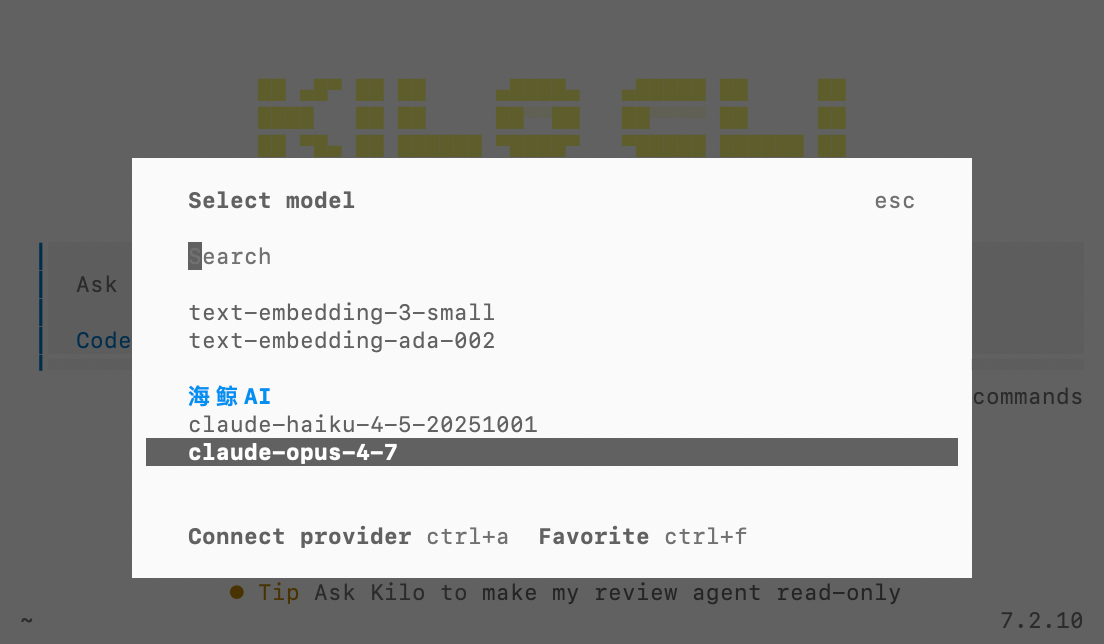
Save the config, restart Kilo CLI, type /models, search for SeaWhale AI and pick the model you want.
Getting started
Starting Kilo CLI
bash
cd your-project    # Change into your project
kilo               # Start Kilo CLI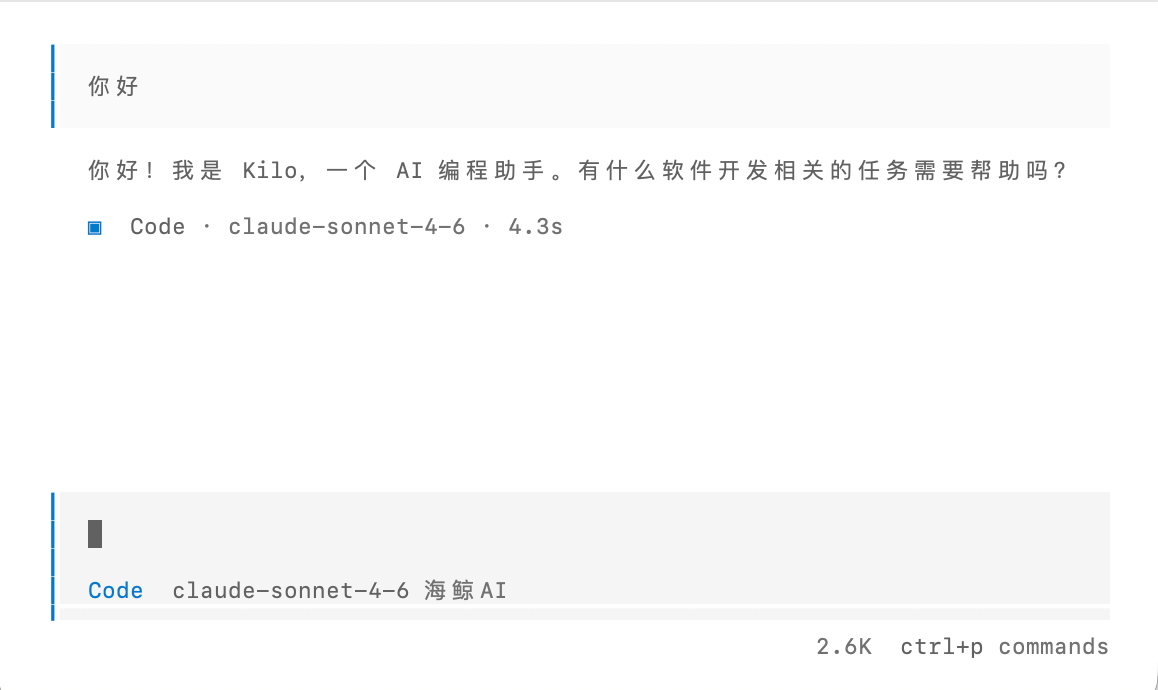
TIP
Kilo CLI uses the current directory as project context, so start it in the right place.
Common commands
| Command | What it does |
|---|---|
/models | Browse and switch models |
/clear | Clear conversation history |
/help | Show help |
Worked examples
Example 1: code generation
👤 User:
Write a TypeScript function that deduplicates an array and sorts it ascending

🤖 Kilo CLI:
function deduplicateAndSort(arr: number[]): number[] {
  return [...new Set(arr)].sort((a, b) => a - b);
}

// Example
console.log(deduplicateAndSort([3, 1, 4, 1, 5, 9, 2, 6, 5]));
// Prints: [1, 2, 3, 4, 5, 6, 9]
Example 2: debugging
👤 User:
Why is the Promise result always undefined here?
async function fetchData() {
  fetch('https://api.example.com/data').then(res => res.json());
}

🤖 Kilo CLI:
The async function never returns the result of fetch(). Here is the fix:
async function fetchData() {
  return fetch('https://api.example.com/data').then(res => res.json());
}
// Or with await:
async function fetchData() {
  const res = await fetch('https://api.example.com/data');
  return res.json();
}
Example 3: generating unit tests
👤 User:
Generate unit tests for this function:
function add(a: number, b: number): number {
  return a + b;
}
Kilo CLI generates complete Jest or Vitest test cases covering normal values, boundary values, negative numbers and similar cases.
FAQ
Q1: I get an error or no response after connecting
Possible causes and fixes:
- Wrong API key — sign in to the SeaWhale AI console, regenerate the key and copy it again
- Wrong baseURL — confirm it is
https://api.atalk-ai.com/v1(note the trailing/v1) - Wrong model name — check the model ID against the model list
- Insufficient balance — check your balance in the console and top up
Q2: How do I switch models?
Type /models, search by name (for example claude or gpt-5) and select the model you want.
If the model is missing, add it under models in the config file and restart Kilo CLI.
Q3: How do I add more models?
Add entries under models in the config file:
json
"models": {
  "claude-sonnet-4-6": {
    "name": "claude-sonnet-4-6"
  },
  "gpt-5-mini": {
    "name": "gpt-5-mini"
  }
}
Save and restart Kilo CLI, and the new models appear under /models.
Q4: How do I update Kilo CLI?
bash
npm install -g @kilocode/cli@latestQ5: Which programming languages are supported?
Kilo CLI supports all mainstream programming languages:
Supported languages
Web development: JavaScript, TypeScript, HTML, CSS, Vue, React
Backend development: Python, Java, Go, Rust, C/C++, C#, PHP, Ruby
Mobile development: Swift, Kotlin, Dart (Flutter)
Data science: Python (NumPy/Pandas), R, SQL
Other: Shell, YAML, JSON, Markdown
Error codes
| HTTP status | Meaning | How to fix |
|---|---|---|
| 401 | API key auth failed | Check the API key; confirm baseURL is https://api.atalk-ai.com/v1 |
| 403 | Insufficient permission | Check API key permissions and model access |
| 429 | Rate limited | Wait a moment and retry, or increase your account quota |
| 500 | Server error | Retry later, or contact support |
Related resources
- 📚 Quick start — SeaWhale AI API basics
- 🎯 Model list — every available model
- 🔧 API reference — the complete API documentation
Other AI coding tools
| Tool | Platform | Characteristics |
|---|---|---|
| Kilo CLI | CLI | Open source, flexible configuration, terminal-based |
| Claude Code | CLI | Official Anthropic tool, deep code understanding |
| OpenCode | CLI | Lightweight, open source, easy to pick up |
| Cline | VSCode | IDE extension, plans and runs multi-step tasks |
Support
| Channel | Response time | Best for |
|---|---|---|
| 📖 Documentation | Immediate | Common questions |
| 💬 Live support | Weekdays 9:00–18:00 | Real-time technical questions |
| 📧 Email support | Within 24 hours | Detailed reports and feedback |
© 2024 SeaWhale AI. All rights reserved.
Last updated 2026-04-17